> ## Documentation Index
> Fetch the complete documentation index at: https://cometchat-22654f5b-docs-restapi-chatapi-quotedmessages.mintlify.site/llms.txt
> Use this file to discover all available pages before exploring further.

# Build Your Chef Agent with Mastra

> Follow these steps to create a Chef Agent in Mastra that can suggest ingredient substitutions, build recipes from a pantry list, and integrate into your app.

Imagine a virtual sous-chef who listens to your ingredient list and responds with suggestions, techniques, or even a full recipe—all served via a chat UI.

***

## What You’ll Build

* A **Mastra agent** that thinks like a seasoned home cook.
* **Tools** for helpful interactive features—substitute ingredients, create recipes.
* A conversational UI (React example provided).
* A deployable agent available via Mastra’s API.

***

## Prerequisites

* A Mastra project (`npx create-mastra@latest my-mastra-app`).
* Node.js installed.
* OpenAI API key in `.env` as `OPENAI_API_KEY`.
* Optional: Familiarity with Zod schema for structured output.

***

<h3 className="text-2xl font-semibold mb-6 mt-8">
  <span className="inline-flex items-center px-4 py-1.5 rounded-full bg-emerald-100 text-emerald-700 dark:bg-emerald-900/30 dark:text-emerald-300 uppercase tracking-wide text-sm">Step 1</span>
</h3>

## Create the Tools

<Steps>
  <Step title="Substitute tool">Create a tool to suggest ingredient substitutions.</Step>
  <Step title="Recipe tool">Create a tool that generates a simple recipe from a pantry list.</Step>
</Steps>

**`src/tools/suggest-substitute-tool.ts`**:

```ts
import { createTool } from '@mastra/core/tools';
import { z } from 'zod';

export const suggestSubstituteTool = createTool({
  id: 'suggest-substitute',
  description: 'Suggest a substitute for an ingredient.',
  inputSchema: z.object({
    ingredient: z.string().describe('Ingredient to substitute'),
  }),
  outputSchema: z.object({
    substitute: z.string(),
    reason: z.string(),
  }),
  execute: async ({ context }) => {
    const ingredient = context.ingredient.toLowerCase();
    const map: Record<string, { substitute: string; reason: string }> = {
      milk: { substitute: 'almond milk', reason: 'Similar texture and flavor' },
      butter: { substitute: 'margarine', reason: 'Same fat profile for cooking/baking' },
    };
    return map[ingredient] || {
      substitute: 'No direct match',
      reason: 'Choose an ingredient with similar flavor or texture.',
    };
  },
});
```

**`src/tools/recipe-from-pantry-tool.ts`**:

```ts
import { createTool } from '@mastra/core/tools';
import { z } from 'zod';

export const recipeFromPantryTool = createTool({
  id: 'recipe-from-pantry',
  description: 'Generate a simple recipe using available ingredients.',
  inputSchema: z.object({
    ingredients: z.array(z.string()).min(1),
  }),
  outputSchema: z.object({
    title: z.string(),
    steps: z.array(z.string()),
  }),
  execute: async ({ context }) => {
    const { ingredients } = context;
    return {
      title: 'Pantry Special',
      steps: [
        `Use ${ingredients.join(', ')}.`,
        'Cook and enjoy!',
      ],
    };
  },
});
```

***

<h3 className="text-2xl font-semibold mb-6 mt-8">
  <span className="inline-flex items-center px-4 py-1.5 rounded-full bg-emerald-100 text-emerald-700 dark:bg-emerald-900/30 dark:text-emerald-300 uppercase tracking-wide text-sm">Step 2</span>
</h3>

## Create the Agent

**`src/agents/chef-agent.ts`**:

```ts
import { openai } from '@ai-sdk/openai';
import { Agent } from '@mastra/core/agent';
import { Memory } from '@mastra/memory';
import { LibSQLStore } from '@mastra/libsql';

import { suggestSubstituteTool } from '../tools/suggest-substitute-tool';
import { recipeFromPantryTool } from '../tools/recipe-from-pantry-tool';

export const chefAgent = new Agent({
  name: 'Chef Agent',
  instructions: `
You are a friendly home chef. Help users cook based on their available ingredients.
Use 'suggest-substitute' to offer alternatives.
Use 'recipe-from-pantry' to build recipes from their list.
Keep answers short and clear.
  `,
  model: openai('gpt-5'),
  tools: {
    'suggest-substitute': suggestSubstituteTool,
    'recipe-from-pantry': recipeFromPantryTool,
  },
  memory: new Memory({
    storage: new LibSQLStore({ url: 'file:../mastra.db' }),
  }),
});
```

***

<h3 className="text-2xl font-semibold mb-6 mt-8">
  <span className="inline-flex items-center px-4 py-1.5 rounded-full bg-emerald-100 text-emerald-700 dark:bg-emerald-900/30 dark:text-emerald-300 uppercase tracking-wide text-sm">Step 3</span>
</h3>

## Register the Agent in Mastra

**`src/mastra/index.ts`**:

```ts
import { Mastra } from '@mastra/core/mastra';
import { PinoLogger } from '@mastra/loggers';
import { LibSQLStore } from '@mastra/libsql';

import { chefAgent } from '../agents/chef-agent';

export const mastra = new Mastra({
  agents: { chef: chefAgent }, // "chef" is the REST id
  storage: new LibSQLStore({ url: 'file:../mastra.db' }),
  logger: new PinoLogger({ name: 'Mastra', level: 'info' }),
});
```

> The **key** in `agents: { chef: chefAgent }` determines the API path: `/api/agents/chef/*`.

***

<h3 className="text-2xl font-semibold mb-6 mt-8">
  <span className="inline-flex items-center px-4 py-1.5 rounded-full bg-emerald-100 text-emerald-700 dark:bg-emerald-900/30 dark:text-emerald-300 uppercase tracking-wide text-sm">Step 4</span>
</h3>

## Run the Agent

From your project root:

```bash
rm -rf .mastra/output
npx mastra dev
```

You should see:

```
Mastra API running on port http://localhost:4111/api
```

<h3 className="text-2xl font-semibold mb-6 mt-8">
  <span className="inline-flex items-center px-4 py-1.5 rounded-full bg-emerald-100 text-emerald-700 dark:bg-emerald-900/30 dark:text-emerald-300 uppercase tracking-wide text-sm">Step 5</span>
</h3>

## Deploy & Production

<AccordionGroup>
  <Accordion title="Ping test">
    ```bash
    curl -X POST http://localhost:4111/api/agents/chef/generate \
      -H "Content-Type: application/json" \
      -d '{"messages":[{"role":"user","content":"ping"}]}'
    ```
  </Accordion>

  <Accordion title="Temporary public tunnel">
    <p>Use a tunnel to test the agent before full deployment:</p>

    ```bash
    ngrok http 4111
    cloudflared tunnel --url http://localhost:4111
    loca.lt --port 4111
    ```

    <p>Append <code>/api/agents/chef/generate</code> and copy the HTTPS URL into the Dashboard.</p>
  </Accordion>

  <Accordion title="Vercel serverless example (TypeScript)">
    ```ts
    // api/agents/chef/generate.ts
    import type { VercelRequest, VercelResponse } from '@vercel/node';
    import { chefAgent } from '../../../src/agents/chef-agent';

    export default async function handler(req: VercelRequest, res: VercelResponse) {
      if (req.method !== 'POST') return res.status(405).json({ error: 'Method not allowed' });
      try {
        const { messages } = req.body || {};
        const result = await chefAgent.respond({ messages });
        return res.status(200).json(result);
      } catch (e: any) {
        return res.status(500).json({ error: e.message || 'Agent error' });
      }
    }
    ```
  </Accordion>

  <Accordion title="Production patterns">
    <ul>
      <li><b>Serverless:</b> Single lightweight function calling the agent.</li>
      <li><b>Container:</b> Long‑lived process; add health checks & logging.</li>
      <li><b>Edge:</b> Keep tools stateless; externalize persistence.</li>
    </ul>
  </Accordion>

  <Accordion title="Security essentials">
    <ul>
      <li>Rate‑limit (per IP + user).</li>
      <li>Add auth (Bearer/JWT) for non-public usage.</li>
      <li>Log tool calls (name, duration, success/error).</li>
    </ul>
  </Accordion>

  <Accordion title="CometChat mapping">
    Deployment URL = public HTTPS endpoint + <code>/api/agents/chef/generate</code>. Mastra Agent ID = <code>chef</code>.
  </Accordion>
</AccordionGroup>

***

<h3 className="text-2xl font-semibold mb-6 mt-8">
  <span className="inline-flex items-center px-4 py-1.5 rounded-full bg-emerald-100 text-emerald-700 dark:bg-emerald-900/30 dark:text-emerald-300 uppercase tracking-wide text-sm">Step 6</span>
</h3>

## Configure in CometChat

<Steps>
  <Step title="Open Dashboard">Open the <a href="https://app.cometchat.com/" target="_blank" rel="noreferrer">CometChat Dashboard</a>.</Step>
  <Step title="Navigate">Go to your App → <b>AI Agents</b>.</Step>
  <Step title="Add agent">Set <b>Provider</b>=Mastra, <b>Agent ID</b>=<code>chef</code>, <b>Deployment URL</b>=your public generate endpoint.</Step>
  <Step title="(Optional) Enhancements">Add greeting, prompts, and configure actions/tools if you use frontend tools.</Step>
  <Step title="Enable">Save and ensure the agent toggle shows <b>Enabled</b>.</Step>
</Steps>

***

<h3 className="text-2xl font-semibold mb-6 mt-8">
  <span className="inline-flex items-center px-4 py-1.5 rounded-full bg-emerald-100 text-emerald-700 dark:bg-emerald-900/30 dark:text-emerald-300 uppercase tracking-wide text-sm">Step 7</span>
</h3>

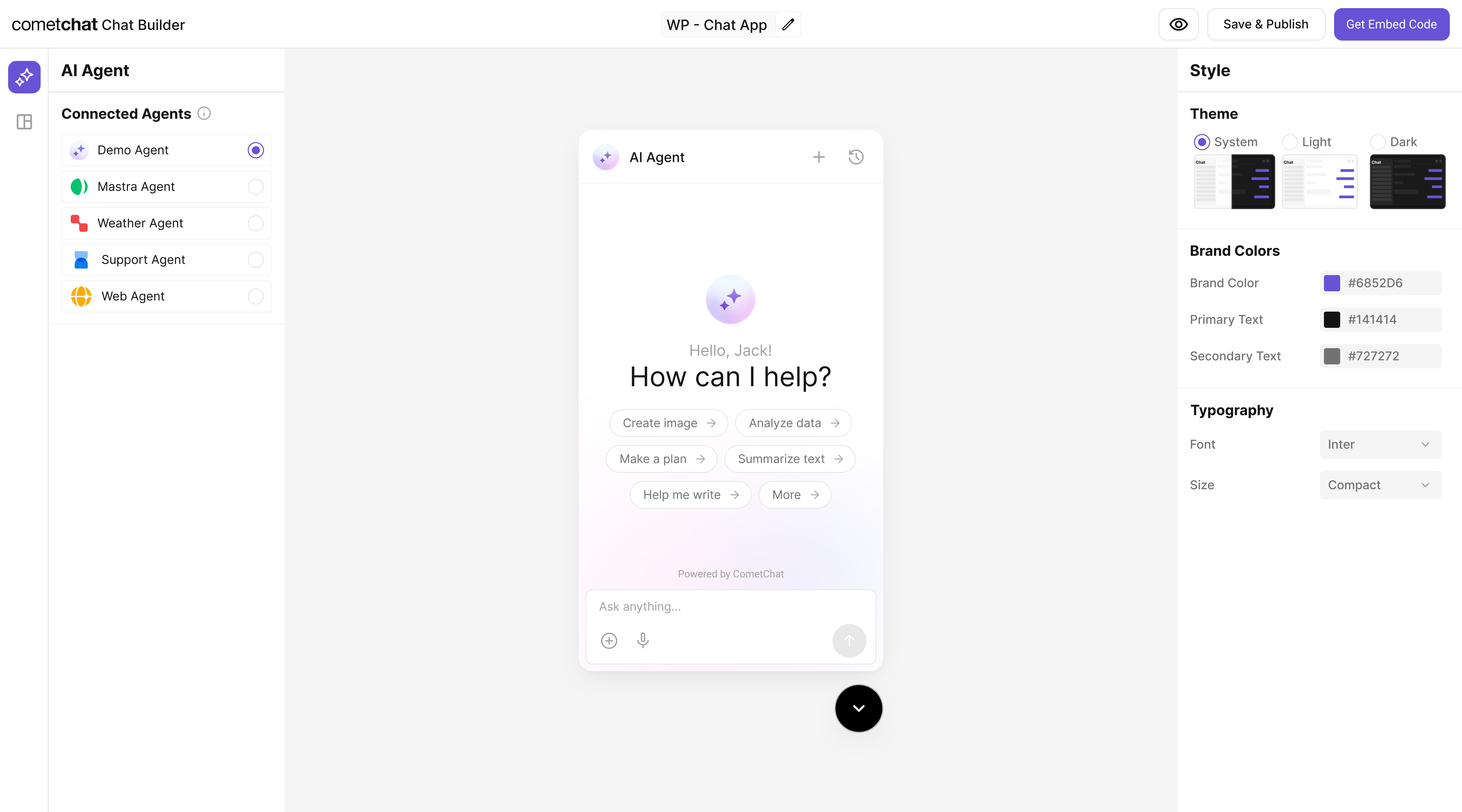
## Customize in Chat Builder

<Steps>
  <Step title="Open variant">From <b>AI Agents</b> click the variant (or Get Started) to enter Chat Builder.</Step>
  <Step title="Customize & Deploy">Select <b>Customize and Deploy</b>.</Step>
  <Step title="Adjust settings">Theme, layout, features; ensure the Mastra agent is attached.</Step>
  <Step title="Preview">Use live preview to validate responses & any tool triggers.</Step>
</Steps>

<Frame>
  <img src="https://mintcdn.com/cometchat-22654f5b-docs-restapi-chatapi-quotedmessages/18q2h91RI8aL99f3/images/ai-agent-chat-builder-preview.png?fit=max&auto=format&n=18q2h91RI8aL99f3&q=85&s=e98ce3ee2edd918479288098bdfd4e11" width="5760" height="3200" data-path="images/ai-agent-chat-builder-preview.png" />
</Frame>

***

<h3 className="text-2xl font-semibold mb-6 mt-8">
  <span className="inline-flex items-center px-4 py-1.5 rounded-full bg-emerald-100 text-emerald-700 dark:bg-emerald-900/30 dark:text-emerald-300 uppercase tracking-wide text-sm">Step 8</span>
</h3>

## Integrate

Once your agent is configured, you can integrate it into your app using the CometChat No Code - Widget

<CardGroup>
  <Card title="No Code - Widget" icon={<img src="/docs/images/products/ai-agents.svg" alt="Widget" />} description="Embed / script" href="/widget/ai-agents" horizontal />

  <Card title="React UI Kit" icon={<img src="/docs/images/icons/react.svg" alt="React" />} href="https://www.cometchat.com/docs/ui-kit/react/ai-assistant-chat" horizontal>Pre Built UI Components</Card>
</CardGroup>

> **Note:** The **Mastra agent** you connected in earlier steps is already part of the exported configuration, so your end-users will chat with that agent immediately.

***

<h3 className="text-2xl font-semibold mb-6 mt-8">
  <span className="inline-flex items-center px-4 py-1.5 rounded-full bg-emerald-100 text-emerald-700 dark:bg-emerald-900/30 dark:text-emerald-300 uppercase tracking-wide text-sm">Step 9</span>
</h3>

## Test Your Setup

<Steps>
  <Step title="API generates response">POST to <code>/api/agents/chef/generate</code> returns a recipe or suggestion.</Step>
  <Step title="Agent listed"><code>/api/agents</code> includes <code>"chef"</code>.</Step>
  <Step title="Tool action works">UI handles <code>suggest-substitute</code> tool invocation.</Step>
  <Step title="Full sample test (run curl)">See curl command below.</Step>
</Steps>

```bash
curl -X POST http://localhost:4111/api/agents/chef/generate \
  -H "Content-Type: application/json" \
  -d '{
    "messages": [
      { "role": "user", "content": "I have pasta, tomatoes, garlic — make me dinner" }
    ]
  }'
```

***

## Troubleshooting

* **Agent not found**: Check the `agents` map in `mastra/index.ts`.
* **Tool not firing**: Ensure the `id` matches exactly between the tool file and the agent.
* **API key errors**: Confirm `OPENAI_API_KEY` is set.

***

## Next Steps

* Add more tools (e.g., nutritional info, shopping list builder).
* Add a workflow to decide automatically between quick tips and full recipes.
* Localize outputs for different languages.