> ## Documentation Index
> Fetch the complete documentation index at: https://cometchat-22654f5b-docs-restapi-chatapi-quotedmessages.mintlify.site/llms.txt
> Use this file to discover all available pages before exploring further.

# AI Agents

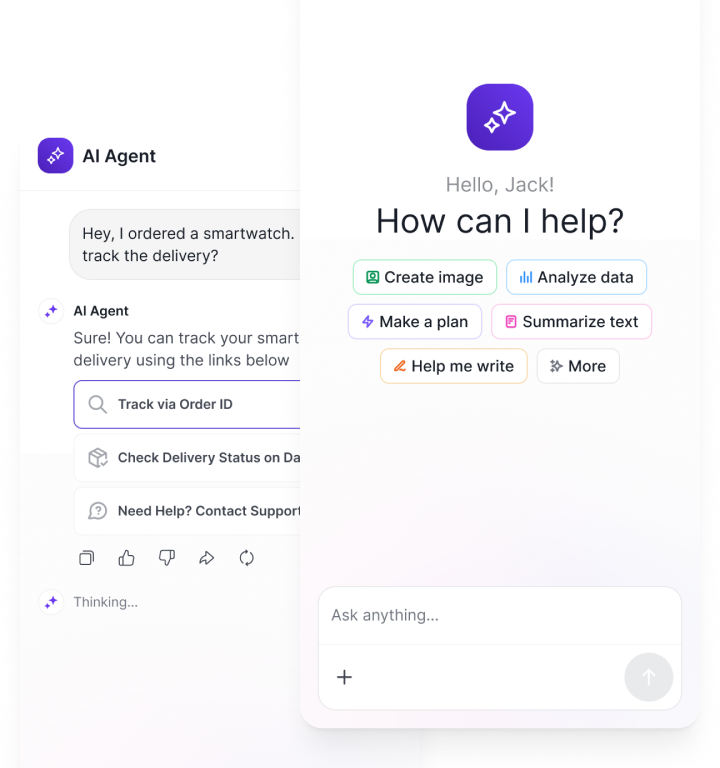
> Build and ship AI agents in chat: pick a provider, connect your agent, and export UI or embed widgets.

{/* Hero */}

<div className="relative w-full flex items-center justify-center" style={{ height: '20rem', overflow: 'hidden' }}>
  <div className="absolute inset-0 bg-primary dark:bg-primary-light" style={{ opacity: 0.05 }} />

  <div style={{maxWidth: '70rem', marginLeft: 'auto', marginRight: 'auto', paddingLeft: '1.25rem', paddingRight: '1.25rem' }}>
    <Columns cols={2} className="items-center gap-x-12">
      <div className="flex flex-col justify-center h-full text-center md:text-left">
        <h1 className="text-gray-700 dark:text-white" style={{ fontSize: '2.2rem', fontWeight: '600' }}>AI Agents</h1>

        <p className="text-lg text-gray-600">
          Plug in your provider, wire actions, and ship chat UI — in minutes, not sprints.
        </p>
      </div>

      <div className="flex flex-col items-center justify-center h-full">
        <img src="https://mintcdn.com/cometchat-22654f5b-docs-restapi-chatapi-quotedmessages/18q2h91RI8aL99f3/images/ai-agent-banner-1.png?fit=max&auto=format&n=18q2h91RI8aL99f3&q=85&s=f78afc2504edd6b9b88e355f35352c02" alt="AI Agents" className="w-full max-w-[340px]" width="720" height="768" data-path="images/ai-agent-banner-1.png" />
      </div>
    </Columns>
  </div>
</div>

<div style={{marginTop: '2rem', marginBottom: '2rem', maxWidth: '70rem', marginLeft: 'auto', marginRight: 'auto', paddingLeft: '1.25rem', paddingRight: '1.25rem' }}>
  {/* Overview */}

  <div className="mb-10">
    <h2 className="text-gray-700 dark:text-white text-2xl font-semibold">Overview</h2>

    <p className="text-gray-600 dark:text-gray-300">
      Easily create, customize, and deploy intelligent AI chatbots, agents, and copilots right into your app with CometChat AI Agents.

      <br />

      <br />

      CometChat AI Agents connect your app’s logic, state, and user context to AI-powered assistants that deliver engaging, interactive experiences — whether through embedded UIs or fully headless interfaces. You get everything you need to build, deploy, and monitor AI-assisted features that feel seamless, helpful, and deeply integrated.

      <br />

      <br />

      With model-agnostic flexibility, CometChat AI Agents let you upgrade your AI stack anytime - without disrupting your user experience.
    </p>
  </div>

  <div className="mb-10">
    <h2 className="text-gray-700 dark:text-white text-2xl font-semibold">Integrate AI Agents</h2>
    <p className="text-gray-600 dark:text-gray-300">Three core steps to get an AI Agent into your product.</p>

    <Steps className="mt-6">
      <Step title="Connect your AI Agent" description="Link an existing agent or provider deployment.">
        <p className="text-gray-600 dark:text-gray-300">Start by linking your AI builders. Choose from popular platforms (OpenAI, Mastra, LangGraph and many more..)</p>

        <CardGroup cols={4} className="mt-4">
          <Card title="Mastra" icon={<img src="/docs/images/icons/mastra.svg" alt="Mastra" />} href="/ai-agents/mastra" horizontal />

          <Card title="LangGraph" icon={<img src="/docs/images/icons/lang-graph.svg" alt="LangGraph" />} horizontal>Coming Soon</Card>
          <Card title="Agno" icon={<img src="/docs/images/icons/agno.svg" alt="Agno" />} horizontal>Coming Soon</Card>
          <Card title="CrewAI Flows" icon={<img src="/docs/images/icons/crew-ai.svg" alt="CrewAI Flows" />} horizontal>Coming Soon</Card>
        </CardGroup>

        <p className="text-gray-500 text-sm mt-3">More providers coming…</p>
      </Step>

      <Step title="Setup Frontend Actions & Tools" description="Extend what the agent can do in your UI.">
        <p className="text-gray-600 dark:text-gray-300">Create and manage frontend actions and tools to enhance your agent’s capabilities.</p>

        <div className="flex flex-wrap gap-3 mt-4">
          <a href="/docs/ai-agents/actions" className="inline-flex items-center gap-1 px-4 py-2 rounded-md border border-gray-300 dark:border-gray-600 text-sm font-medium hover:bg-gray-50 dark:hover:bg-gray-800" target="_blank">Get Started with Actions ↗</a>
          <a href="/docs/ai-agents/tools" className="inline-flex items-center gap-1 px-4 py-2 rounded-md border border-gray-300 dark:border-gray-600 text-sm font-medium hover:bg-gray-50 dark:hover:bg-gray-800" target="_blank">Get Started with Tools ↗</a>
        </div>

        <p className="text-gray-500 text-sm mt-3">Actions: trigger UI & workflows. Tools: structured capabilities the agent can call.</p>
      </Step>

      <Step title="Add to your frontend" description="Choose no‑code widget, prebuilt components, or headless SDK.">
        <p className="text-gray-600 dark:text-gray-300">Customize the agent’s appearance and copy the embed code to integrate it into your app.</p>

        <CardGroup cols={3} className="mt-4">
          <Card title="No Code - Widget" icon={<img src="/docs/images/icons/ai-agents.svg" alt="Widget" />} description="No‑code" href="/ai-agents/chat-widget" horizontal />

          <Card title="React UI Kit" icon={<img src="/docs/images/icons/react.svg" alt="React" />} href="https://www.cometchat.com/docs/ui-kit/react/ai-assistant-chat" horizontal>Pre Built UI Components</Card>
          <Card title="JavaScript SDK" icon={<img src="/docs/images/icons/js.svg" alt="JavaScript SDK" />} horizontal>Coming Soon</Card>
        </CardGroup>

        <CardGroup cols={3} className="mt-4">
          <Card title="React Native" icon={<img src="/docs/images/icons/react.svg" alt="React Native" />} horizontal>Coming Soon</Card>
          <Card title="Android" icon={<img src="/docs/images/icons/android.svg" alt="Android" />} horizontal>Coming Soon</Card>
          <Card title="iOS Swift" icon={<img src="/docs/images/icons/swift.svg" alt="iOS Swift" />} horizontal>Coming Soon</Card>
        </CardGroup>

        <CardGroup cols={3} className="mt-4">
          <Card title="Flutter" icon={<img src="/docs/images/icons/flutter.svg" alt="Flutter" />} horizontal>Coming Soon</Card>
        </CardGroup>
      </Step>
    </Steps>
  </div>
</div>

{/* Footer */}

<div className="flex flex-col w-full mt-8" style={{ background: 'black' }}>
  <div className="bg-black text-gray-400 py-6 px-8 flex flex-col md:flex-row justify-between items-center rounded-t-xl">
    <div className="mb-4 md:mb-0">
      2025 © CometChat
    </div>

    <div className="flex space-x-6 items-center">
      <a href="https://www.linkedin.com/company/cometchat" target="_blank" className="flex items-center space-x-1 hover:text-white transition-colors">
        <svg xmlns="http://www.w3.org/2000/svg" className="h-5 w-5" fill="currentColor" viewBox="0 0 24 24">
          <path d="M19 0h-14c-2.761 0-5 2.239-5 5v14c0 2.762 2.239 5 5 5h14c2.762 0 5-2.238 5-5v-14c0-2.761-2.238-5-5-5zm-11 19h-3v-10h3v10zm-1.5-11.268c-.966 0-1.75-.784-1.75-1.75s.784-1.75 1.75-1.75 1.75.784 1.75 1.75-.784 1.75-1.75 1.75zm13.5 11.268h-3v-5.604c0-1.337-.026-3.059-1.865-3.059-1.865 0-2.15 1.455-2.15 2.96v5.703h-3v-10h2.881v1.367h.041c.402-.76 1.384-1.561 2.847-1.561 3.044 0 3.606 2.003 3.606 4.609v5.585z" />
        </svg>

        <span>LinkedIn</span>
      </a>

      <a href="https://x.com/cometchat" target="_blank" className="flex items-center space-x-1 hover:text-white transition-colors">
        <svg xmlns="http://www.w3.org/2000/svg" className="h-5 w-5" fill="currentColor" viewBox="0 0 24 24">
          <path d="M22.162 5.656c-.793.352-1.645.589-2.54.696a4.468 4.468 0 0 0 1.958-2.46 9.043 9.043 0 0 1-2.845 1.088 4.496 4.496 0 0 0-7.664 4.1 12.758 12.758 0 0 1-9.272-4.7 4.493 4.493 0 0 0 1.393 6.002 4.46 4.46 0 0 1-2.035-.562v.057a4.497 4.497 0 0 0 3.606 4.41 4.503 4.503 0 0 1-2.029.077 4.502 4.502 0 0 0 4.198 3.12 9.01 9.01 0 0 1-5.575 1.922c-.362 0-.721-.021-1.077-.063a12.73 12.73 0 0 0 6.901 2.021c8.282 0 12.808-6.86 12.808-12.808 0-.195-.005-.388-.014-.58a9.152 9.152 0 0 0 2.25-2.336z" />
        </svg>

        <span>Twitter</span>
      </a>

      <a href="https://github.com/cometchat" target="_blank" className="flex items-center space-x-1 hover:text-white transition-colors">
        <svg xmlns="http://www.w3.org/2000/svg" className="h-5 w-5" fill="currentColor" viewBox="0 0 24 24">
          <path d="M12 .297c-6.63 0-12 5.373-12 12 0 5.303 3.438 9.8 8.205 11.387.6.113.82-.258.82-.577v-2.17c-3.338.726-4.033-1.416-4.033-1.416-.546-1.387-1.333-1.756-1.333-1.756-1.089-.744.084-.729.084-.729 1.205.084 1.84 1.236 1.84 1.236 1.07 1.835 2.807 1.305 3.495.997.108-.775.418-1.305.76-1.605-2.665-.3-5.467-1.332-5.467-5.932 0-1.31.467-2.382 1.235-3.222-.123-.303-.535-1.523.117-3.176 0 0 1.008-.322 3.3 1.23a11.5 11.5 0 0 1 3.003-.404 11.5 11.5 0 0 1 3.003.404c2.292-1.552 3.298-1.23 3.298-1.23.653 1.653.241 2.873.118 3.176.77.84 1.233 1.912 1.233 3.222 0 4.61-2.807 5.628-5.48 5.922.429.369.813 1.096.813 2.211v3.281c0 .319.218.694.825.576C20.565 22.092 24 17.592 24 12.297c0-6.627-5.373-12-12-12" />
        </svg>

        <span>GitHub</span>
      </a>
    </div>
  </div>
</div>
